Sometimes a plugin or theme needs a new page in the admin area, this is post will explain how to do this.
There are a number of functions that can be called to make this happen, but they all use add_menu_page or add_submenu_page. Want to see how this all fits together? The code is on github.
The overview of this is that a function that calls add_menu_page, add_submenu_page, one of the other functions described below must be hooked into the admin_menu hook.
So in a normally bootstrapped WordPress plugin, that might look like this.
// hooked into `plugins_loaded` in the main plugin file
function chrisguitarguy_adminpages_load()
{
    add_action('admin_menu', 'chrisguitarguy_adminpages_add');
}

function chrisguitarguy_adminpages_add()
{
    // call `add_menu_page` or `add_submenu_page`, etc
}
Adding a Top Level Menu Page
This is done with add_menu_page.
// hooked into `admin_menu`, see above
function chrisguitarguy_adminpages_add()
{
    add_menu_page(
        // page <title> tag, localize it like any other user-facing string
        __('Example Top-Level Page', 'chrisguitarguy-adminpages'),
        // text displayed in the menu, localize it
        __('Example Top', 'chrisguitarguy-adminpages'),
        // what capability is required to access this? `manage_options` would be
        // an admin-level user.
        'manage_options',
        // page url slug, prefix like anything else
        'chrisguitarguy-adminpages-toplevel',
        // callback, this is called to display the actual page
        'chrisguitarguy_adminpages_callback',
        // this is the icon URL, we'll skip this, but it can be used to
        // show a custom ICON in the menu.
        '',
        // position, where in the menu should this page be displayed?
        // higher number === lower on the page, can use ints or floats here
        1000
    );
}

// show the page
function chrisguitarguy_adminpages_callback()
{
    include __DIR__.'/../views/page.php';
}
Here’s an illustration of where all those values passed end up displayed on the page.

On the Admin Page $function
This callable is invoked by WordPress to actually show the page. I like to keep the actual HTML itself in a separate view file.
Whatever the organization, the callback should do two things to conform to the style of the rest of the WordPress admin.
- Wrap the entire admin page with a
<div class="wrap">. - Use an
<h1>to show the page title.
<?php
// in views/page.php
// exit if WordPress isn't loaded
!defined('ABSPATH') && exit;
?>
<div class="wrap">
    <h1>Admin Page Example</h1>
    <?php /* other things here */ ?>
</div>
Adding Submenu Pages
Call add_submenu_page instead of add_menu_page.
// hooked into `admin_menu`, see above
function chrisguitarguy_adminpages_add()
{
    add_submenu_page(
        // the page under which the submenu page should be nested
        'options-general.php',
        // page <title> tag, localize it like any other user-facing string
        __('Example Submenu Page', 'chrisguitarguy-adminpages'),
        // text displayed in the menu, localize it
        __('Example Submenu', 'chrisguitarguy-adminpages'),
        // what capability is required to access this? `manage_options` would be
        // an admin-level user.
        'manage_options',
        // page url slug, prefix like anything else
        'chrisguitarguy-adminpages-submenu',
        // callback, this is called to display the actual page
        'chrisguitarguy_adminpages_callback'
    );
}
Here’s an illustration of where all those variables end up.

There are quite a few other functions that are small wrappers around add_submenu_page that add pages under specific places in the admin area.
function chrisguitarguy_adminpages_add()
{
    // Under Tools
    add_management_page(
        __('Example Management Page', 'chrisguitarguy-adminpages'),
        __('Example Manage', 'chrisguitarguy-adminpages'),
        'manage_options',
        'chrisguitarguy-adminpages-management',
        'chrisguitarguy_adminpages_callback'
    );
    // Under Settings
    add_options_page(
        __('Example Options Page', 'chrisguitarguy-adminpages'),
        __('Example Options', 'chrisguitarguy-adminpages'),
        'manage_options',
        'chrisguitarguy-adminpages-options',
        'chrisguitarguy_adminpages_callback'
    );
    // Under Appearance
    add_theme_page(
        __('Example Theme Page', 'chrisguitarguy-adminpages'),
        __('Example Theme', 'chrisguitarguy-adminpages'),
        'manage_options',
        'chrisguitarguy-adminpages-theme',
        'chrisguitarguy_adminpages_callback'
    );
    // Under Themes
    add_plugins_page(
        __('Example Plugin Page', 'chrisguitarguy-adminpages'),
        __('Example Plugin', 'chrisguitarguy-adminpages'),
        'manage_options',
        'chrisguitarguy-adminpages-plugin',
        'chrisguitarguy_adminpages_callback'
    );
    // Under Users
    add_users_page(
        __('Example User Page', 'chrisguitarguy-adminpages'),
        __('Example User', 'chrisguitarguy-adminpages'),
        'manage_options',
        'chrisguitarguy-adminpages-user',
        'chrisguitarguy_adminpages_callback'
    );
}

Adding Submenus Under Post Types
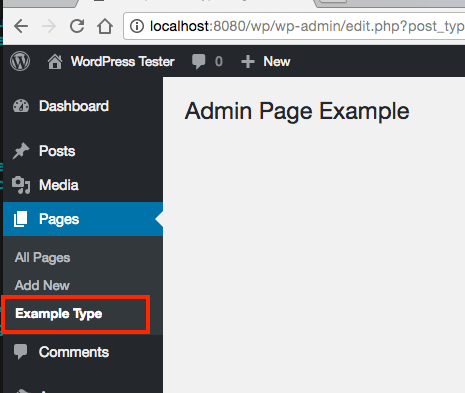
Submenu pages can be added under post types by using edit.php?post_type={posttype} as the $parent_slug argument.
To add a submenu page under the Pages area, for example:
function chrisguitarguy_adminpages_add()
{
    // Under Pages
    add_submenu_page(
        'edit.php?post_type=page',
        __('Example Post Type Page', 'chrisguitarguy-adminpages'),
        __('Example Type', 'chrisguitarguy-adminpages'),
        'manage_options',
        'chrisguitarguy-adminpages-type',
        'chrisguitarguy_adminpages_callback'
    );
}
Permission Errors on Admin Pages
If any hook other than one of the admin_menu hooks is used to add the menu pages, a “Sorry, you are not allowed to access this page” message will be show.
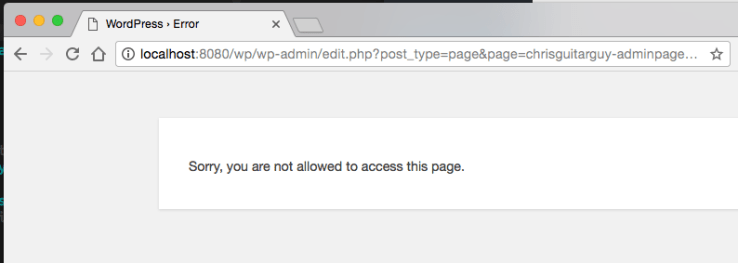
This is broken:
function chrisguitarguy_adminpages_load()
{
    add_action('admin_init', 'chrisguitarguy_adminpages_add');
}

function chrisguitarguy_adminpages_add()
{
    // ...
}
Always be sure to hook into admin_menu or one of the other hooks described below.
- add_action('admin_init', 'chrisguitarguy_adminpages_add');
+ add_action('admin_menu', 'chrisguitarguy_adminpages_add');
Other Hooks for Adding Menu Pages
One of three hooks may be used to add menu page.
admin_menu— what we’ve used here, this one always fires in single-site admin areas.network_admin_menu— fires in WordPress multi-site’s network admin area.user_admin_menu— fires in WordPress multi-site’s user admin area (/wp-admin/user/).
Note that these hooks are exclusive. admin_menu will never fire on a network admin page, so choose the one that makes the most sense for the use case.
 Christopher Davis